

How to Set Up a Recurring Card Payment
Want your hosting to renew by itself? Save a card to your Noiz Console account. From then on, every invoice is charged to it automatically and you never have to log in to pay.
Last reviewed: 21 October 2026, against the current Noiz Console.
Two Ways to Save Your Card
Section titled “Two Ways to Save Your Card”Use whichever suits you. Both take about a minute.
-
Pay your next invoice by card. The card is saved automatically when you pay. Follow How to Pay Your Invoice by Card.
-
Add a card now, before anything is due. Log in to the Console, click the account icon at the top right and choose Payment Methods. Click Add New Credit Card, enter your card details and click Save Changes.
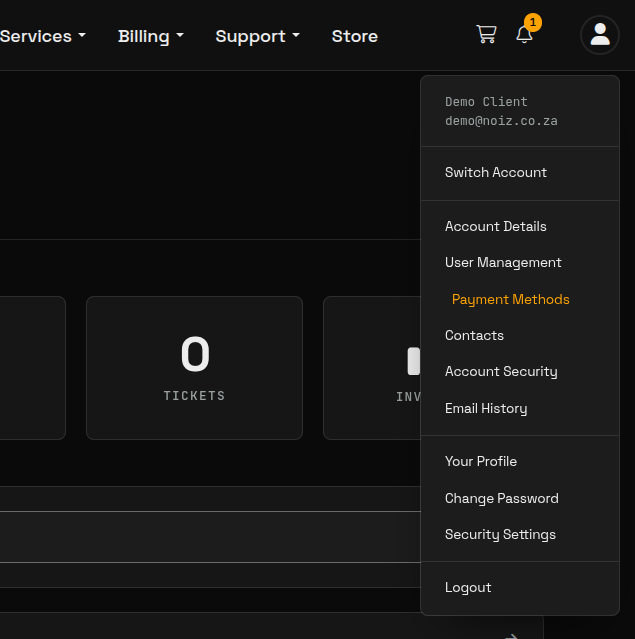

That is all. There is nothing else to switch on.
What Happens Each Billing Period
Section titled “What Happens Each Billing Period”- 7 days before the due date: we email you the invoice, so you can see what will be charged.
- 1 day before the due date: the invoice is charged to your Default card and marked Paid. Your receipt arrives by email.
Your card details are held securely by our card processor, Stripe, never on Noiz servers.
Change Which Card Is Charged
Section titled “Change Which Card Is Charged”Automatic charges always go to your Default card. To use a different card, add it under Payment Methods (account icon at the top right) and click Set as default on it.
Invoices that were already issued before you changed the default may still be due. Open any unpaid invoice and pay it by hand with the new card.
Saved cards cannot be deleted from the Console. To stop a card being charged, set another card as default, or ask Noiz support to remove it.
If an Automatic Charge Fails
Section titled “If an Automatic Charge Fails”If your card is declined (expired, insufficient funds or blocked by your bank), the invoice stays Unpaid and we email you.
- Pay the invoice by hand from Billing > My Invoices, and update your saved card so the next charge works.
- We retry a failed charge once a week for up to three weeks, but an unpaid service is suspended 20 days after its due date, so do not wait for the retry.
Cards that ask for your bank’s approval on every payment (a code or a prompt in your banking app each time) cannot be charged automatically, because nobody is there to approve it. If your card works this way, pay each invoice by hand when the email arrives, or ask your bank whether it can approve recurring payments.
Other Ways to Pay
Section titled “Other Ways to Pay”Card is the simplest way to pay, and the only one that renews automatically. South African clients can also pay by EFT, and anyone can pay with Monero (XMR). Both are paid by hand for each invoice; see How to View and Pay an Invoice.
If you would like help setting this up, contact Noiz support.
[noiz] | disrupt the signal