

When Your Domain's Email Is Hosted Elsewhere, Set Plesk Mail Service to Outgoing Only
This guide is for a domain that is hosted on your Noiz Plesk account for its website, while its email lives with another provider such as Google Workspace or Microsoft 365. It explains one setting that decides whether mail sent from the server to that domain reaches your real mailbox, and shows you how to check it.
The short version: for every domain whose email is hosted elsewhere, open its Mail Settings in Plesk and set Mail service on this domain to Disabled for incoming mail. Leave it on Enabled and the server keeps delivering to its own local mailboxes for that domain, which nobody reads.
Last reviewed: 19 October 2026, against the current Plesk Obsidian release on Noiz hosting. This guide is written for Noiz hosting and is kept current against Plesk. It complements, and does not replace, the official Plesk documentation linked below.
Official Documentation Reference
Section titled “Official Documentation Reference”- Mail Settings of Domains (Plesk Customer Guide): the setting itself and what each option does.
- Using External Mail Servers such as Gmail (Plesk Customer Guide): Plesk’s procedure for pointing a domain’s mail at an outside provider.
- Setting Up Mail Forwarding (Plesk Customer Guide): the forwarder this guide most often affects.
Why This Setting Matters
Section titled “Why This Setting Matters”The Noiz mail server decides where to deliver a message by asking one question first: is the recipient’s domain one of mine? If the domain’s mail service is Enabled in Plesk, the answer is yes, and the message goes straight into the mailbox on the server. The server never looks up the domain’s MX record, so it never finds out that the real mailbox is at Google or Microsoft.
This only affects mail that starts on the Noiz server. Mail from the outside world follows the MX record and arrives at your provider as normal, which is why the problem is easy to miss. The mail that goes astray is the mail you would least expect to lose:
- Forwarders. A forwarder from a mailbox on the server to an address at the external domain delivers its copy to the local mailbox, not to your provider.
- Your other domains on the same account. Anything one of your mailboxes on the server sends to the external domain.
- Website mail. Contact forms, WordPress notices, security plugin alerts and shop orders from any site on the server that sends to an address at that domain.
Set the mail service to Disabled for incoming mail and the server treats the domain like any other outside domain: it follows the MX record and hands the message to your provider. Websites and mailboxes on the server can still send mail as that domain.
Check the Setting
Section titled “Check the Setting”1. Log in to Plesk and open Websites & Domains.
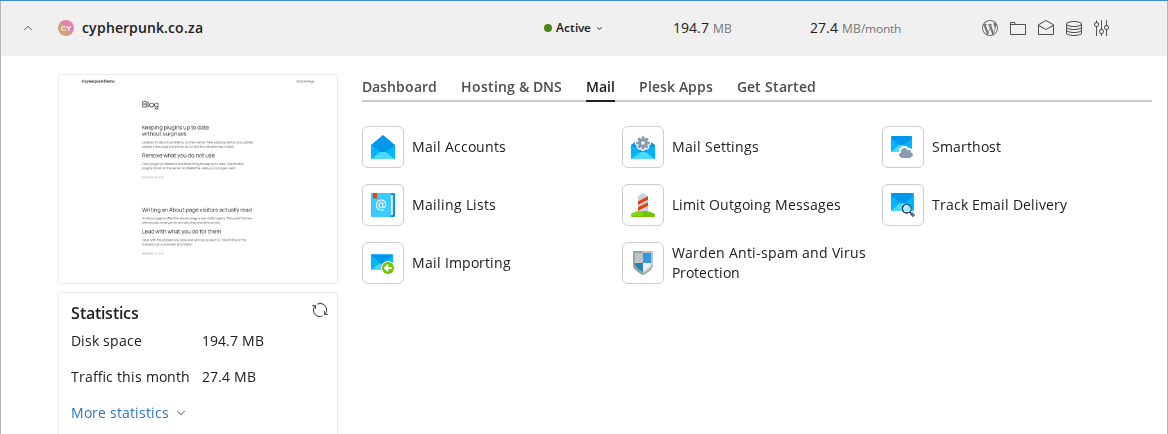
2. On the card of the domain whose email is hosted elsewhere, open the Mail tab and click Mail Settings.
3. Look at Mail service on this domain. It has three options, and the wording under each one is Plesk’s own.
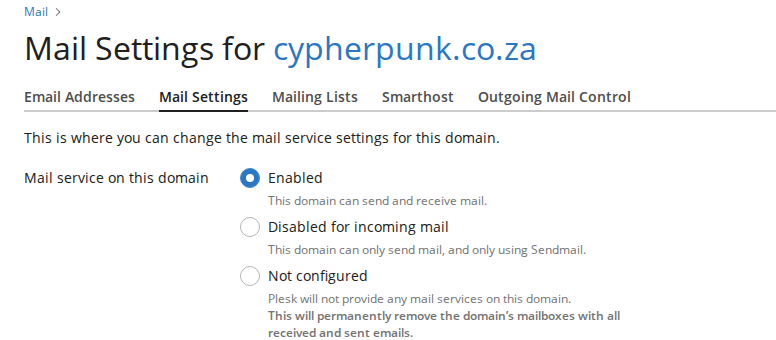
| Option | Plesk’s description | What it means on Noiz hosting |
|---|---|---|
| Enabled | This domain can send and receive mail. | The server delivers mail for this domain to its own mailboxes. Correct only when Noiz hosts the mail. |
| Disabled for incoming mail | This domain can only send mail, and only using Sendmail. | The server delivers incoming mail by MX record, so it reaches your provider. Websites and scripts on the server can still send mail as the domain. Correct when the mail is at Google Workspace, Microsoft 365 or any other provider. |
| Not configured | Plesk will not provide any mail services on this domain. This will permanently remove the domain’s mailboxes with all received and sent emails. | Switches mail off completely and deletes every mailbox on the domain, with everything in them. Outgoing mail by MX record still works, because the server no longer treats the domain as local. Use it only when you are certain nothing in those mailboxes is wanted; there is no undo. |
4. If it is Enabled and the domain’s mail is hosted elsewhere, choose Disabled for incoming mail and click OK.
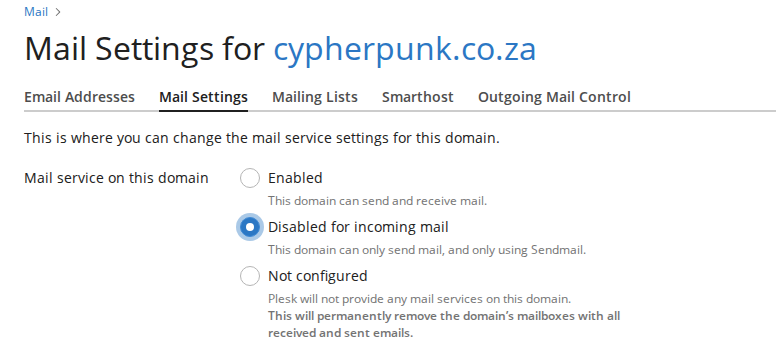
Choose Not configured only if you also want the old mailboxes and their contents gone. Read them, or re-send what you need, first: see the next section.
Plesk shows a notice on the domain’s Mail page that the mail service is turned off. For a domain whose mail is hosted elsewhere, that notice is correct and expected.
Recover Mail Already Delivered Locally
Section titled “Recover Mail Already Delivered Locally”Messages that arrived while the setting was Enabled are still in the local mailbox on the server. Open the mailbox in Plesk webmail to read them, or ask Noiz support to re-send them to your provider. Re-sent messages keep their original date, so look back through your inbox rather than at the top of it.
Troubleshooting
Section titled “Troubleshooting”Symptom: A forwarder to an address at the external domain never arrives, but the same forwarder to a Gmail or Outlook.com address works. The destination domain’s mail service is Enabled on the server. Follow the check above.
Symptom: Website contact-form mail or shop orders sent to the external domain never arrive, though messages from customers do. Same cause: outside senders follow the MX record, the server does not.
Symptom: The Mail page says the mail service is turned off. For a domain hosted elsewhere this is the correct state. Switching it back to Enabled would reintroduce the problem above.
Conclusion
Section titled “Conclusion”One setting per domain decides whether the Noiz server delivers to itself or to your provider. Set every externally hosted domain to Disabled for incoming mail (or Not configured once its old mailboxes are no longer needed) and mail from your websites, your other mailboxes and your forwarders reaches the mailbox you actually read.
Browse the Noiz knowledgebase for more tutorials, or contact the Noiz support team if you get stuck.
[noiz] | disrupt the signal