

How to Password-Protect a Backup in Plesk
Password protection encrypts a Plesk backup so that the sensitive data stored inside it, including your database user passwords and mail account credentials, cannot be read by anyone who obtains the backup file. This guide shows you how to turn password protection on for backups of your Noiz Plesk hosting account. In the Plesk interface this feature is labelled Password Protection; you may also see it referred to as backup encryption.
Last reviewed: 27 July 2026, against the current Plesk Obsidian release. This guide is written for Noiz hosting and is kept current against Plesk. It complements, and does not replace, the official Plesk documentation linked below.
Official Documentation Reference
Section titled “Official Documentation Reference”- Plesk Documentation and Help Portal (Obsidian, Customer Guide: Backing Up and Restoring Websites)
Prerequisites
Section titled “Prerequisites”- A Noiz hosting account on Plesk, and your login details for the Plesk control panel.
- A password manager or another safe place to store the protection password. Noiz cannot recover it for you.
Turn On Password Protection for Backups
Section titled “Turn On Password Protection for Backups”1. Log in to Plesk
Section titled “1. Log in to Plesk”Sign in to your Plesk control panel with your account credentials.
2. Open Backup & Restore
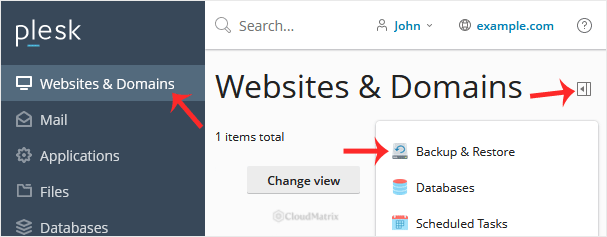
Section titled “2. Open Backup & Restore”Go to Websites & Domains. On the domain you want to back up, open the expand (pull-down) icon to show the full list of tools, then choose Backup & Restore.
3. Open Remote Storage Settings
Section titled “3. Open Remote Storage Settings”In the Backup Manager, click Remote Storage Settings.

4. Edit the Password Protection setting
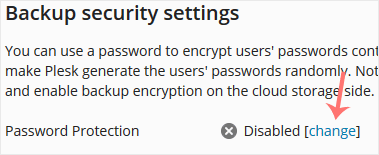
Section titled “4. Edit the Password Protection setting”Find Password Protection. If it shows Disabled on the right, click Change.
5. Set a password and apply
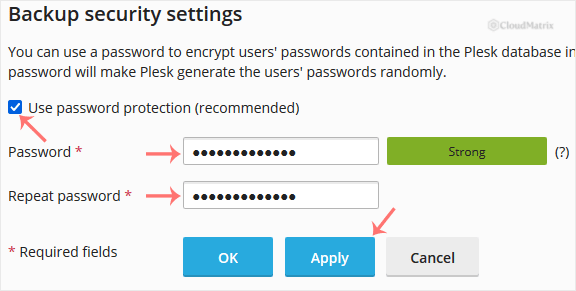
Section titled “5. Set a password and apply”Tick Use password protection, enter a password, and click Apply. From now on, new backups are encrypted with this password.
Why This Matters, and the One Thing Not to Forget
Section titled “Why This Matters, and the One Thing Not to Forget”Store the password somewhere safe, because you will need the exact same password to restore a protected backup. Noiz does not hold a copy of it and cannot reset it, so if it is lost the encrypted contents of that backup cannot be recovered.
The password protects more than the files themselves. It also protects the credentials Plesk stores inside the backup. If you restore a backup and either enter the wrong password or the backup was created without password protection, Plesk cannot decrypt the stored database credentials, so it restores your databases with newly generated random passwords instead. Any application that connects to those databases, such as a WordPress or other CMS configuration, would then need its connection password updated to match. Keeping the correct password to hand avoids this.
Need a Hand?
Section titled “Need a Hand?”If you are on a Noiz managed plan, or you are unsure about your backup and restore setup, contact Noiz support and the team will help you configure and verify it.
[noiz] | disrupt the signal