

PHP Handlers on Noiz Hosting, and Which to Choose
The PHP handler is the setting that decides how your PHP code gets run. It sits on the PHP Settings page of your control panel, it has four or five options with similar-looking names, and nothing on the page explains what the difference is.
This guide explains what each one means, which one Noiz recommends, and the single fact that makes the whole list easier to read. It is a reference: the two guides on the recommended web server configuration and on running WordPress on nginx without Apache both point here rather than re-explaining it.
Last reviewed: 4 August 2026, against the current Plesk Obsidian release. The handler names in this guide were read from a live Plesk panel while writing it. This guide is written for Noiz hosting and is kept current against Plesk. It complements, and does not replace, the official Plesk documentation linked below.
Official Documentation Reference
Section titled “Official Documentation Reference”- Choosing the PHP Handler (Plesk administrator guide): the vendor’s description of each handler.
- Apache and nginx Settings (Plesk customer guide): where Proxy mode lives, which constrains what appears in the handler list.
- PHP-FPM: the PHP project’s own documentation for the process manager doing the work.
Prerequisites
Section titled “Prerequisites”- A Noiz hosting plan whose control panel is Plesk, and your login for it.
- Read The recommended web server configuration on Noiz hosting first if the words nginx and Apache in the same sentence are new to you. This guide assumes that model.
The one fact that makes the list readable
Section titled “The one fact that makes the list readable”PHP-FPM is running in every case. It is not a mode you switch on, and there is no option that turns it off.
“FPM application served by Apache” and “FPM application served by nginx” describe which web server calls PHP-FPM. Nothing more. The same process manager runs your code either way, with the same PHP version, the same memory limit and the same settings.
Plesk puts it the same way: the FPM handlers “can be served by either Apache or nginx”.
Once that lands, the list stops looking like five different ways to run PHP and starts looking like what it is: two current handlers, FPM and Dedicated FPM, each of which can be served by Apache or by nginx; one older handler they replaced, FastCGI; and two that are kept for very old applications.
The handlers, against the recommended setup
Section titled “The handlers, against the recommended setup”Open Websites & Domains, open the domain, and click the PHP link (it shows your current version, for example PHP Version 8.4.24). The PHP Handler dropdown is near the top.
Dedicated FPM application served by Apache, the recommendation on shared hosting.
nginx passes the request to Apache, Apache reads .htaccess and applies whatever is in it, and Apache calls PHP-FPM. “Dedicated” means your site gets its own pool of PHP processes rather than sharing one with other sites on the subscription, so a slow page on one site cannot starve another. Plesk names this “the recommended PHP handler on Plesk for Linux servers used for shared hosting”. Pair it with Serve static files directly by nginx so that images and stylesheets still skip Apache entirely.
FPM application served by Apache. Identical, except the PHP processes are shared across the subscription rather than dedicated to one site. Perfectly reasonable on a single-site subscription. Plesk calls the plain FPM handler “the recommended PHP handler on dedicated Plesk for Linux servers”.
FPM application served by nginx, and Dedicated FPM application served by nginx.
Apache is removed from the request path for PHP. Faster and lighter, because there is one web server instead of two and no Apache worker is held for the length of the response. The cost is real and it is not negotiable: nginx does not read .htaccess, so every rule in it stops applying. Plesk’s own wording:
The main difference between the two options is that PHP handlers served by nginx ignore the contents of the
.htaccessfile, which is sometimes used to fine-tune a website’s configuration.
This is covered properly, including the translations you need, in Running WordPress on nginx without Apache.
FastCGI application served by Apache. An older design that predates PHP-FPM. It still works, and on Plesk for Linux it is always served by Apache: it cannot be served by nginx. There is no reason to choose it over an FPM handler on a Linux server.
CGI application, and the Apache module (mod_php).
Kept for compatibility with applications that need them, and usually not offered to customers at all. Plesk’s own assessment is blunt, and it is worth quoting rather than paraphrasing:
Plesk Obsidian does also support the ‘ISAPI module’, ‘mod_php served by Apache’, and ‘CGI application’ PHP handlers. However, they are not recommended for use because they are severely outdated and/or insecure.
If a piece of software tells you it needs mod_php, that is a sign the software has not been maintained for a long time. Ask before you rearrange a server around it.
Proxy mode is the switch that matters
Section titled “Proxy mode is the switch that matters”The PHP handler list is not fixed. It changes depending on one setting on a completely different page.
Proxy mode, on the Apache & nginx Settings page, controls whether Apache is in the request path at all. Turn it off and the site becomes nginx-only, and Plesk removes every Apache-served handler from the list. On a Noiz server running an nginx-only site, the PHP Handler dropdown offers exactly two options, both nginx:
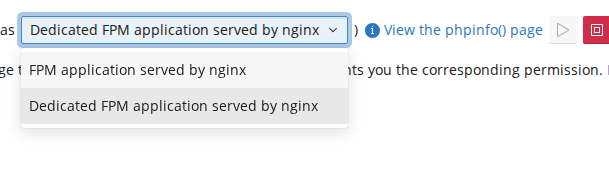
Plesk documents the restriction under the known limitations of nginx-only hosting, and its support knowledge base states the cause directly: with Proxy mode disabled, “FPM application served by Apache and FastCGI application served by Apache are disabled”.
So if you are hunting for an Apache-served handler and cannot find it, you are not missing a permission. Proxy mode is off. Turn it back on and the handlers return.
Choosing, in one paragraph
Section titled “Choosing, in one paragraph”If your site uses .htaccess for anything at all, and almost every WordPress site does, choose Dedicated FPM application served by Apache and enable Serve static files directly by nginx. You get nginx handling every asset and Apache handling only the pages, which is where the .htaccess rules actually matter. If your site has no .htaccess, or only the standard WordPress permalink block, an nginx-served handler is faster still and worth considering. Everything else on the list is history.
How to check what your site is using
Section titled “How to check what your site is using”From the panel, the PHP Handler field shows it directly.
From a terminal, the response header tells you which web server answered:
curl -sI https://yourdomain.com/ | grep -i '^server:'nginx appears on every Noiz site, because nginx is always at the front. That tells you nothing about the handler on its own. What does tell you is whether an .htaccess rule takes effect: add a harmless one, request a page, and see whether it applied. If it did, PHP is being served by Apache.
Troubleshooting
Section titled “Troubleshooting”Symptom: the handler you want is not in the dropdown. Either it is not enabled server-wide for that PHP version, or Proxy mode is off and you are looking for an Apache-served handler. Check Proxy mode first.
Symptom: the site returns 404 on every page except the home page after changing the handler. The handler was switched to an nginx-served one and the permalink rules in .htaccess are no longer being read. See Running WordPress on nginx without Apache, or switch the handler back.
Symptom: changing the PHP version reset the handler. Handler availability is per PHP version on the server, so a version that does not offer your previous handler will fall back. Re-select it after changing version.
Symptom: PHP settings changed on one site affected another. That is the difference between the plain FPM handler and the Dedicated one. Move the site to a dedicated pool if it needs to be isolated.
Need a hand?
Section titled “Need a hand?”Noiz sets the handler as part of provisioning and reviews it on managed plans. If you are unsure which one your site should be on, or a change to it has broken something, open a ticket with the domain name and what you changed, and the team will sort it out.
[noiz] | disrupt the signal