

How to Change the cPanel Theme or Style
If you are looking for where to change how your cPanel interface looks, this guide explains the current position. cPanel now ships two themes: Jupiter, the classic layout that organises tools into menus and categories, and Meridian, a newer goal-based layout that groups features into hubs such as Websites, Email and Files. Whether you can switch between them yourself depends on how your account was set up.
Older tutorials (including earlier versions of this article) described a Change Style tile under Preferences and a choice of colour styles. Those belonged to the paper_lantern theme, which cPanel removed in version 110, and no longer appear in current cPanel. Jupiter still has a Theme menu in its General Information panel, but it now switches between themes, not colour styles.
Last reviewed: 23 September 2026, against the current release of cPanel and WHM. This guide is written for Noiz hosting and is kept current against cPanel. It complements, and does not replace, the official cPanel documentation linked below.
Official Documentation Reference
Section titled “Official Documentation Reference”- The cPanel Interface, General Information (docs.cpanel.net), including the Jupiter Theme menu
- Welcome to Meridian (docs.cpanel.net), including who can switch between Meridian and Jupiter
- Meridian Account Preferences, Switch themes (docs.cpanel.net)
- How to Enable the Meridian Theme (docs.cpanel.net), the server-side view of the same rules
- cPanel and WHM version 110 change log, documenting the paper_lantern removal (docs.cpanel.net)
Jupiter and Meridian
Section titled “Jupiter and Meridian”Both themes give you the same account and the same features; only the layout differs. Jupiter is the familiar cPanel home screen of grouped icons, and it is the theme most guides on this site are written against. Meridian puts common tasks into six hubs and adds a command palette (Ctrl+K, or Cmd+K on macOS) for jumping straight to any tool by name. Switching themes changes only your own account and does not move or alter any data.
Can you switch themes yourself
Section titled “Can you switch themes yourself”The rule is fixed by cPanel, not by Noiz:
- Accounts created on Jupiter (or moved to Jupiter at any point) can switch between Jupiter and Meridian whenever they like, provided the Theme Switching feature is enabled for the account.
- Accounts created on Meridian cannot switch to Jupiter themselves. The Classic cPanel Theme option does not appear. Your host can move the account to Jupiter, after which you can switch freely.
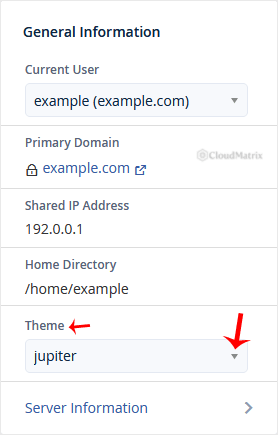
In Jupiter, use the Theme menu in the General Information panel to switch to Meridian. The menu appears only when your account has more than one theme available; see cPanel’s General Information notes.
In Meridian, the switch lives in the Theme section of Account Preferences (click your avatar, then Profile), and Classic cPanel Theme in the header returns you to Jupiter. Follow cPanel’s Switch themes steps for the current screens.
Light and dark appearance is a separate display setting and does not change when you switch themes.
Why the old style switcher is gone
Section titled “Why the old style switcher is gone”The retired paper_lantern theme let each user pick a colour “style”. cPanel removed paper_lantern and its style routing in version 110. The screenshot below shows the old paper_lantern Theme drop-down, kept only so you can recognise it in old tutorials. Jupiter’s Theme menu sits in the same General Information panel, but it lists themes such as Jupiter and Meridian rather than colour styles.
What else you can personalise
Section titled “What else you can personalise”- Change Language displays the whole interface in a different language.
- Account Preferences and Contact Information control notification and contact settings.
Branding and the default theme for new accounts are set on the server by your host.
Troubleshooting
Section titled “Troubleshooting”A guide tells me to open a Theme or Change Style menu, but I cannot find it: the Change Style tile and colour styles belonged to paper_lantern, which cPanel removed in version 110. In Jupiter, the Theme menu in the General Information panel appears only when your account has more than one theme available, and it switches between Jupiter and Meridian. If it is missing, ask Noiz support whether theme switching can be enabled for your account.
I am on Meridian and there is no Classic cPanel Theme option: your account was created on Meridian, or theme switching is not enabled for it. Ask Noiz support to move the account to Jupiter.
My cPanel looks nothing like the screenshots in a guide: you are probably on Meridian while the guide shows Jupiter. Switch to Jupiter if the option is available, or use the command palette to find the tool by name.
Need a hand?
Section titled “Need a hand?”If you want your account moved between themes, or have a specific requirement for how cPanel is presented on your Noiz hosting, contact the Noiz support team through the client area.
[noiz] | disrupt the signal